SEO for SaaS: build pages in this order
By Michael Nefedov, noetio · Updated 20 October 2026
SEO for SaaS works best when you start near the sale: a product page, then pages for people comparing tools, then use-case and integration pages, and only then a blog.
Short answer
- Build in this order: product, alternatives, use-case, integration, blog. Start near the sale.
- Skip broad “what is” posts, mass-made pages and paid links for now.
- Expect months. There is no honest fixed number for SaaS.
Why SaaS SEO starts at the bottom of the funnel
Buyer pages target a specific search with less competition, so each page can be short and focused.
Edward Sturm splits keywords by intent (Sturm, 14 April 2024):
- Bottom: “collaboration software with intuitive learning”. He says these have very low competition.
- Middle: “enterprise collaboration software”.
- Top: “what is collaboration software”. He says these need 2,000-3,000+ words and “don't convert immediately”.
“Target keywords that are down the funnel – Compact Keywords – and you will work less and make more.”

These are his numbers and his opinion, not a study, and he sells a paid program on these keywords. A new site has few links, so a specific search with less competition is a sensible place to start. The page order below is ours, built on that idea.
The page types, in order
Build five page types in this order: product, alternatives, use-case, integration, blog.
| # | Page type | Search it answers | Example |
|---|---|---|---|
| 1 | Product page | “[what you do] software”, plus your key feature | Your home page and one page per core feature |
| 2 | Alternatives page | “[competitor] alternatives” | Profound alternatives |
| 3 | Use-case page | “[tool type] for [job or team]” | “CRM for freelancers” |
| 4 | Integration page | “[your category] + [other tool]” | “Invoicing with Stripe” |
| 5 | Blog post | Problem and how-to questions | How to get your website on Google |
1. Product page
One page per thing you sell. Put the main keyword in the title, the meta description, the URL, the H1 and the first sentence (this is our habit, not a Google rule). Say what it is, for whom, and what to do next. Add a clear call to action at the top and at the bottom.
2. Alternatives pages
People who type “[competitor] alternatives” already know the problem. Write one page per competitor you really compete with. List the options with prices read from each vendor's own page, dated. Include yourself, and say where a competitor wins. Our alternatives hub and Profound alternatives show the format.
3. Use-case pages
One page per job or team you serve. Show the exact steps your product takes for that job. Reuse the same sections across pages, and change the details, not only the name.
4. Integration pages
Only for integrations that work today. Say what syncs, what does not, and how to set it up. Do not list integrations you plan to build.
5. Blog posts
Write them when the pages above exist. Each post should answer one problem your buyer has, link to the matching product page, and be better than the top results, with real steps and sources.
How to find the searches
Copy your competitors' wording, check Google's suggestions, then let Search Console show what you already earn.
- List your closest competitors. Open their pricing, alternatives and feature pages. Copy the words in their titles and H1s.
- Type each idea into Google and note the autocomplete and “People also ask” boxes.
- After a few weeks, open Search Console, Performance, Queries. The searches you already show for are your next pages.
- Pick one keyword per page. If two pages fit one keyword, merge them.
A simple outline for an alternatives page
- Title: “[Competitor] alternatives: N tools compared (year)”. One sentence that answers the question.
- A table: tool, what it does, price with a source link and date, who it fits.
- A short section per tool, including where the competitor wins.
- Your own product in two or three sentences, near the end.
- Real buyer questions as an FAQ. Use the questions Google shows under “People also ask”.
What to skip at first
Skip broad posts, mass-made pages and paid links until the buyer pages are live.
- Broad “what is [category]” posts. Sturm says they are competitive and do not convert immediately.
- Hundreds of mass-made pages. We have no data on where Google draws the line, so add pages in small batches and check that they get indexed.
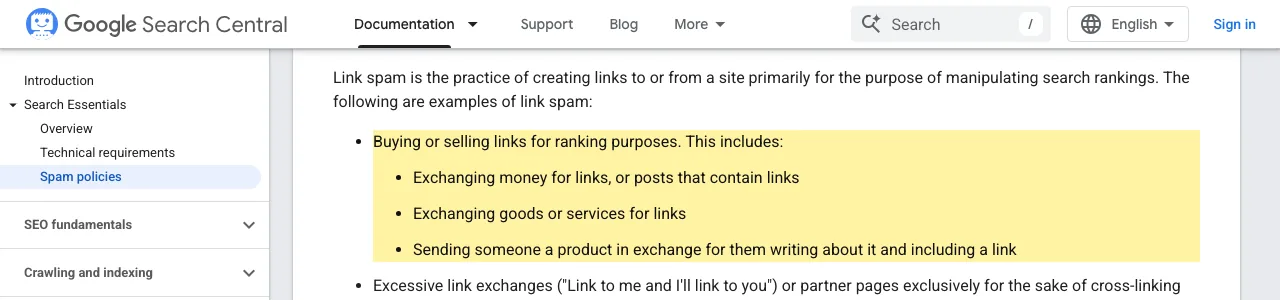
- Paid backlinks. Google's spam policies list buying or selling links for ranking purposes as link spam (Google).
Make it findable
Put every page in a sitemap and link to it from another page.
- Link each page from your home page or footer, so crawlers have a path to it.
- Submit the sitemap in Search Console.
- Google says crawling can take anywhere from a few days to a few weeks (Google).

How long SEO for SaaS takes
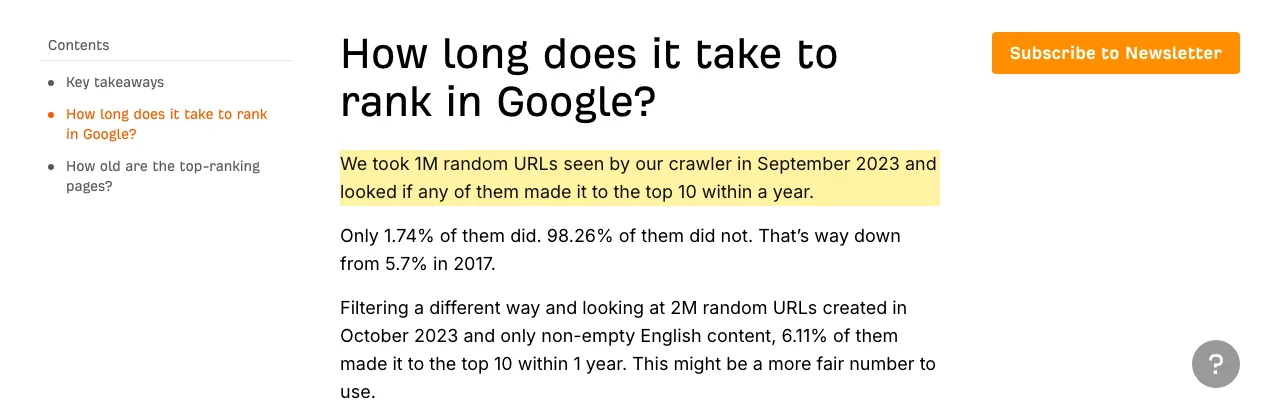
Plan for months: there is no honest fixed number. Ahrefs' study gives two answers for reaching the top 10 within a year (Ahrefs):
1.74%
of 1 million random URLs its crawler saw in September 2023. Likely includes pages nobody tried to rank.
Ahrefs. Source
6.11%
of 2 million random URLs created in October 2023, non-empty English content only. Ahrefs says this “might be a more fair number to use”.
Ahrefs. Source
- 2017 study5.7%Ahrefs' earlier version of the test, as quoted in the 2025 post.
- Sept 2023, 1M URLs1.74%All random URLs its crawler saw.
- Oct 2023, 2M URLs6.11%Only non-empty English pages created in October 2023.
Ahrefs, Patrick Stox, published 15 May 2025 (modified 12 August 2026). Source, read 21 October 2026.
Ahrefs also reports:
- 40.82% of the pages that ranked in the top 10 did so within 1 month.
- High-volume keywords take longer than low-volume ones.
- After about 6 months without a top-10 spot, it suggests updating the content.
None of this is about SaaS pages in particular. Your result depends on your market and your links, and no source can predict it.
SEO for SaaS checklist
Eight checks keep the plan on track.
- 1Product page with the main keyword in the title, meta description, URL, H1 and first sentence
- 2One alternatives page per real competitor, with dated prices
- 3One use-case page per job you serve
- 4Integration pages only for working integrations
- 5Sitemap submitted, every page linked internally
- 6Search Console checked weekly
- 7Blog posts tied to a product page
- 8Add new pages only after the last ones are indexed
New domain? Follow the week-by-week plan in SEO for startups. Not sure your pages are indexed yet? Start with how to get your website on Google.
Sources
- SEO - Down the Funnel. Edward Sturm, 14 April 2024. https://edwardsturm.com/articles/seo-down-the-funnel/. Read 21 October 2026.
- How Long Does It Take to Rank in Google? And How Old Are Top Ranking Pages? Patrick Stox, Ahrefs, 15 May 2025 (modified 12 August 2026). https://ahrefs.com/blog/how-long-does-it-take-to-rank/. Read 21 October 2026.
- Spam Policies for Google Web Search, link spam. Google Search Central. https://developers.google.com/search/docs/essentials/spam-policies#link-spam. Read 21 October 2026.
- Ask Google to Recrawl Your Website. Google Search Central. https://developers.google.com/search/docs/crawling-indexing/ask-google-to-recrawl. Read 21 October 2026.
Questions
With the pages closest to a buying decision: your product page, then pages for people searching for alternatives to a tool you compete with. Blog posts come last.
Plan for months, not weeks. No source gives a fixed number for SaaS. The Ahrefs data in this guide covers all kinds of pages, and it shows that most random pages do not reach the top 10 within a year.
Not first. Write blog posts after your buyer pages exist, because buyer pages answer a search from someone who is ready to choose a tool.
Not to start. Google Search Console is free and shows the queries and pages that get impressions and clicks. A tool or an agent saves time once you have more pages than you can check by hand.
More guides
- SEO for Startups: Your First 30 Days, Week by Week
- How to get your website to show up on Google
- Agentic SEO: what it is and how it works
- SEO vs GEO: what's different and what stays the same
Turn your next topic into a useful page
Compass reads your website, helps you plan relevant topics and creates sourced article drafts. Review and approve the work, then send it to a connected CMS or export it.
Written by Michael Nefedov, founder of noetio. Updated 20 October 2026.