Technical SEO audit checklist: 10 checks with free tools
By Michael Nefedov, noetio · Updated 20 October 2026
This technical SEO audit checklist has 10 checks you can run with free tools, plus a list of what you can skip.
Short answer
- On a common CMS with a small site, Sturm says you need no serious technical SEO. Still submit a sitemap and inspect new URLs.
- What matters most: can Google index your key pages, and do they show the right title and canonical.
- Free tools: Search Console, PageSpeed Insights, curl. A tool's issue list is not a to-do list.
Do you need this audit?
Small site on a common platform: do checks 1 to 3. Custom, huge or just moved: run all 10.
“If you're not doing those things, you don't really have to worry about technical SEO.”
On a common platform with a small site, do checks 1 to 3 and spend the rest of your time on a page that answers a buyer question. If your site is custom code (Next.js, Astro and so on), huge, or just moved to a new domain or stack, run all 10.
The 10 checks
Checks 1 to 3 tell you if Google can reach and index a page. Checks 4 to 10 tidy the rest. Each has what to run, how to read it and the fix.
1. Is the page indexed? (Search Console, URL Inspection)
Paste the URL into the inspection bar. Google's URL Inspection tool shows one of three states:
- “URL is on Google”
- “on Google, but has issues”
- “not on Google”
The indexed view is not a live test, so it can differ from the page today. “URL is on Google” also does not guarantee the page shows in results.
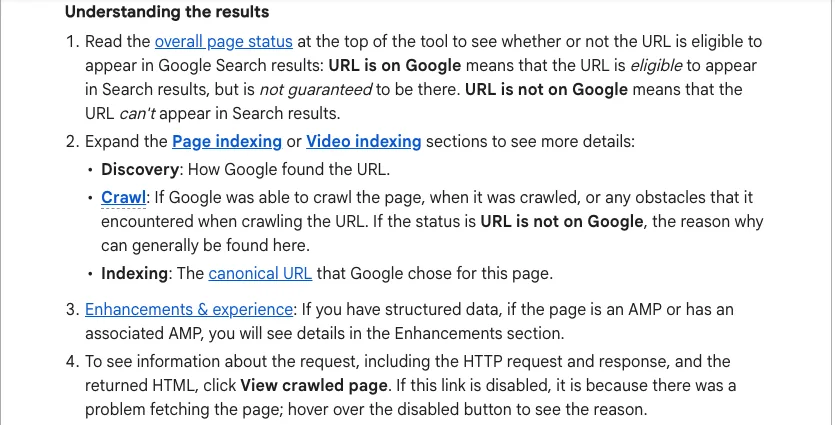
Fix: if “not on Google”, read the reason, fix it, then run the live test and click Request indexing. Google says that does not guarantee indexing.
2. Does the live page work? (Live test)
Click Test live URL. It shows a screenshot and the crawled HTML. If the screenshot is blank or the key text is missing from the HTML, Google may not see your content.
Google says the live test does not check whether the URL is in any sitemap or has referring pages.
3. Is anything blocking it? (curl)
Three curl commands show headers, robots.txt and meta robots.
curl -sIL https://yoursite.com/page | grep -iE "^(HTTP|location|x-robots-tag)"
curl -s https://yoursite.com/robots.txt
curl -s https://yoursite.com/page | tr '\n' ' ' | grep -ioE "<meta[^>]*name=.?(robots|googlebot).?[^>]*>"
Read it: you want a final 200. Any x-robots-tag: noindex, a noindex meta tag, or Disallow: / in robots.txt is a problem.
No output from the meta grep usually means no robots meta tag, but it can also be a tag the pattern misses (for example one added by JavaScript), so use View Source or URL Inspection to be sure.
Fix: remove the rule at its source: the template, the CMS setting or the CDN.
4. One version of the site (curl)
http, https and www should all end on one URL.
for u in http://yoursite.com https://yoursite.com https://www.yoursite.com; do
  curl -sIL -o /dev/null -w "$u -> %{http_code} %{url_effective}\n" $u
done
Read it: all three should end on the same final URL with 200.
Fix: add a 301 redirect from the extra versions to the one you chose.
5. Canonical tag
The canonical should point to the page itself.
curl -s https://yoursite.com/page | tr '\n' ' ' | grep -ioE "<link[^>]*rel=.?canonical.?[^>]*>"
curl -sI https://yoursite.com/page | grep -i '^link:'
Read it: the canonical should point to the page itself, on your final domain.
- The grep matches double-quoted, single-quoted, unquoted, multi-line and upper-case tags.
- It also prints a tag that sits inside an HTML comment, so check the result in View Source.
- The second command shows a canonical sent as an HTTP
Link:header. - It does not catch a canonical added by JavaScript, so no output does not always mean no canonical.
Google calls rel=canonical a strong signal, a sitemap a weak one, and says not to use robots.txt for canonicalization and that it does not recommend noindex to prevent selection of a canonical.
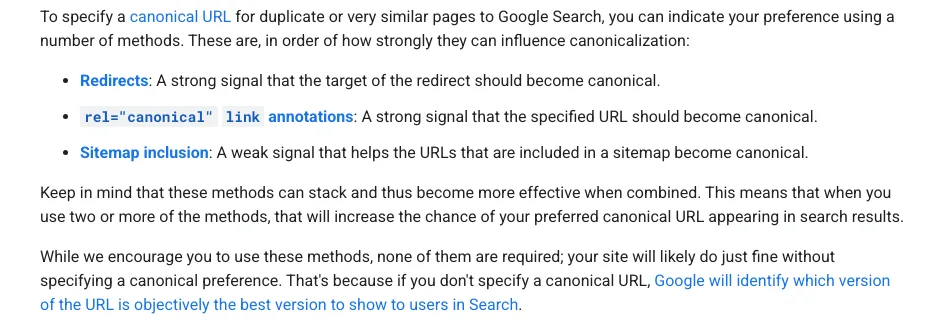
Fix: set a self-referencing canonical in the page template.
6. Sitemap
Open /sitemap.xml. It should list your public pages with final URLs. Submit it in Search Console, Sitemaps.
Google says you might not need one if your site has about 500 pages or fewer and is comprehensively linked internally. It also lists cases where a sitemap helps, such as a new site with few external links.
Fix: remove redirected or noindex URLs from it.
7. Page indexing report
In Search Console, open Pages and compare the indexed count with the number you expect. Look at the reasons for the not-indexed ones. Google explains each reason in its Page indexing report help.
Fix: act on reasons that hit pages you want in search.
8. Core Web Vitals (PageSpeed Insights)
Run your home page and one money page at pagespeed.web.dev, and look at the field data first, if it exists. Google's “good” levels, measured at the 75th percentile:
- LCP: 2.5 seconds or less
- INP: 200 milliseconds or less
- CLS: 0.1 or less
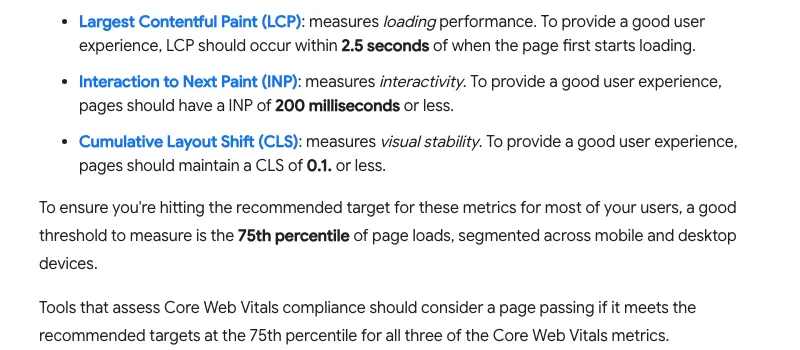
Fix: start with what the PageSpeed Insights report lists for that page.
9. Titles and headings (curl)
curl -s https://yoursite.com/page | grep -ioE "<title>[^<]*</title>|<h1[^>]*>[^<]*</h1>"
Read it: one unique title per page and a clear H1. Google says titles should be descriptive and concise, with distinct text for each page, and it may change a title link that does not reflect the page.
Our house rule is one H1 with the main keyword near the start. Fix: rewrite in the template or CMS.
10. Mobile view and broken links
Open three pages on your phone and click the menu and footer links. Check text is readable and nothing is cut.
In Search Console, the Pages report can show “Not found (404)” as a reason, as the help page describes.
Fix: redirect a removed page to its closest replacement, or restore it.
What to skip
Skip four things until indexing is fine.
Perfect PageSpeed score
Aim to pass the three field metrics from check 8. A lab score of 100 is not one of the three thresholds.
Every warning in a crawler
Missing alt text on a logo or a long URL is not urgent. Fix what blocks indexing first.
Schema for AI answers
Google says there is no special schema.org structured data you need to add for AI Overviews or AI Mode (Google).
Sitemap tuning on a small site
With about 500 pages or fewer, comprehensively linked, Google says you might not need a sitemap.
We re-ran the curl commands on example.com on 21 October 2026. Result: / answers 200, /robots.txt answers 404, there is no robots meta tag, no canonical and no H1, and the title is “Example Domain”. The http, https and www versions each answer 200 with no redirect, so example.com would fail check 4. The thresholds come from the linked sources, read 21 October 2026.
What AI gets wrong in technical audits
AI cannot see your speed, indexing or redirects, so use it to explain results, not to produce them.
If you paste a page into ChatGPT or Claude and ask for a technical audit, it cannot see your speed, indexing or redirects. It will still give a confident list. Use AI to read code and explain a result you got from the tools above. See ChatGPT for SEO and Claude Code SEO for safe ways to use it.
After the audit
If the audit finds your pages are fine, the work is content and links. Start with how to get your website on Google. To read about running checks like these on a schedule, see SEO automation.
Sources
- URL Inspection tool, Search Console Help, Google. Read 21 October 2026.
- Page indexing report, Search Console Help, Google. Read 21 October 2026.
- Learn about sitemaps, Google Search Central, last updated 10 December 2025. Read 21 October 2026.
- How to specify a canonical URL with rel="canonical" and other methods, Google Search Central, last updated 10 July 2026. Read 21 October 2026.
- Influencing your title links, Google Search Central, last updated 10 December 2025. Read 21 October 2026.
- Web Vitals, web.dev (Google), last updated 31 October 2024. Read 21 October 2026.
- AI features and your website, Google Search Central, last updated 10 December 2025. Read 21 October 2026.
- Pareto SEO, Edward Sturm, 13 March 2026. Read 21 October 2026.
Questions
It depends on your site. The first three checks cover whether Google can reach and index a page. Large or custom-built sites need all ten, on more pages.
Google Search Console, PageSpeed Insights and curl (already on Mac and Linux). Optional: a free crawler for sites with hundreds of pages.
Maybe not. Edward Sturm says serious technical SEO matters if you do not use a user-friendly CMS or builder, have a huge site, do programmatic SEO, develop your own web app, or do a migration. For everyone else he still says to submit a sitemap and inspect new URLs in Search Console, and to worry about content next.
Google gives no schedule. Run it after a redesign, migration or platform change, and when Search Console shows a drop in indexed pages.
More guides
- ChatGPT for SEO: 9 Copy-Paste Prompts and 5 Checks
- Claude SEO Skills: What They Are and a SKILL.md Example
- Claude Code SEO: Fix Your Site's SEO From the Repo
Turn your next topic into a useful page
Compass reads your website, helps you plan relevant topics and creates sourced article drafts. Review and approve the work, then send it to a connected CMS or export it.
Written by Michael Nefedov, founder of noetio. Updated 20 October 2026.