Next.js SEO: metadata, sitemap and JSON-LD
By Michael Nefedov, noetio · Updated 21 October 2026
Every Next.js page you want in search needs real HTML, a unique title, a canonical URL and a place in your sitemap. The files for it are app/layout.tsx, your page files, app/sitemap.ts, app/robots.ts and next.config.ts.
Short answer
- Use the metadata API for title, description and canonical. Set
metadataBaseonce in the root layout. - Add app/sitemap.ts and app/robots.ts, both built in. Render content in Server Components.
- Code comes from the Next.js docs and this site, re-built on Next.js 16.2.9 and 16.4.2 on 21 October 2026.
Next.js SEO step 1: titles, descriptions and canonical URLs
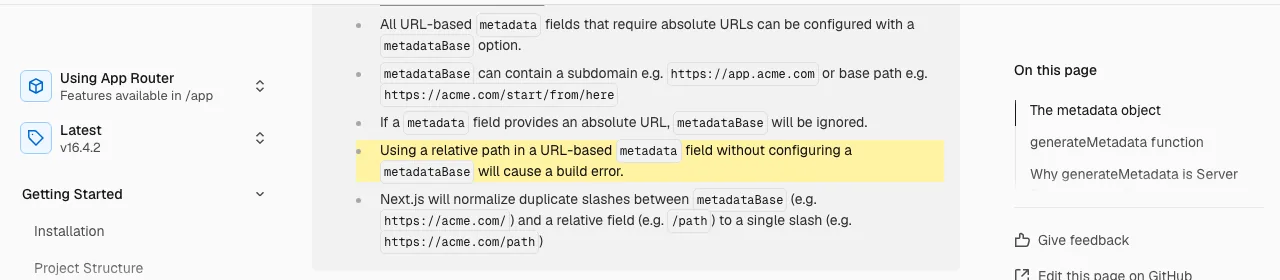
Set metadataBase once in the root layout, because a missing one may not warn you. Next.js then turns relative paths into full URLs.
The Next.js docs say that a relative path in a URL field without metadataBase “will cause a build error”. That is not what we saw. In a test project, with the root layout's metadataBase removed and canonical: "/pricing" kept:
next buildfinished with no error and no warning on 16.2.9 and on 16.4.2, with webpack and with Turbopack.- The page then had
<link rel="canonical" href="/pricing"/>, a relative URL. - With
metadataBaseset, the same build wrotehttps://example.com/pricing.
app/layout.tsx
import type { Metadata } from "next";

export const metadata: Metadata = {
  metadataBase: new URL("https://example.com"),
  title: { default: "Example: what you do", template: "%s | Example" },
};
For a static page, export a metadata object with a title and description that are unique to that page.
app/pricing/page.tsx
export const metadata = {
  title: { absolute: "Pricing for Example: Plans and Limits" },
  description: "Example pricing: what each plan costs and what it includes.",
  alternates: { canonical: "/pricing" },
};
For pages from a database or CMS, use generateMetadata. In Next.js 16, params is a Promise, so you must await it:
app/blog/[slug]/page.tsx
import type { Metadata } from "next";

type Props = { params: Promise<{ slug: string }> };

export async function generateMetadata({ params }: Props): Promise<Metadata> {
  const { slug } = await params;
  const post = await getPost(slug); // your data call
  return {
    title: post.title,
    description: post.summary,
    alternates: { canonical: `/blog/${slug}` },
  };
}
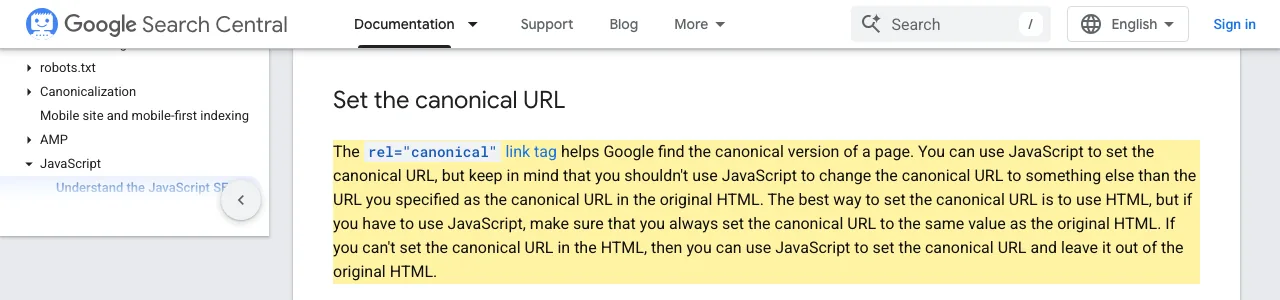
Use one canonical per page, pointing to itself. Google says “the best way to set the canonical URL is to use HTML”, and that JavaScript is allowed only if it sets the same value (Google). The metadata API writes the tag into the HTML.
Sitemap: app/sitemap.ts
One file returns your URL list and Next.js serves it at /sitemap.xml. See the docs.
Here is the real file from this site, getcompassseo.com. It builds the sitemap from one page list. A page in the list is in the sitemap, but you still have to add each new page to the list:
app/sitemap.ts (this site)
import type { MetadataRoute } from "next";
import { SITE } from "@/lib/site";
import { ALL_PAGES } from "@/lib/pages";

export default function sitemap(): MetadataRoute.Sitemap {
  const pages = [...ALL_PAGES.filter((p) => p.href === "/"), ...ALL_PAGES.filter((p) => p.href !== "/")];
  return pages.map((p) => ({
    url: `${SITE.url}${p.href === "/" ? "" : p.href}`,
    lastModified: p.updated,
  }));
}
Two details:
- Use full URLs, not paths.
- Set
lastModifiedto the real date of the last change. Google ignorespriorityandchangefreq, and useslastmodonly if it is consistently accurate (Google).
The example in the Next.js sitemap docs uses new Date() for every URL. That is fine for a demo, but on a real site use the date each page last changed, so the dates stay true.
robots.txt: app/robots.ts
Six lines in app/robots.ts allow every crawler and point to your sitemap.
app/robots.ts (this site)
import type { MetadataRoute } from "next";
import { SITE } from "@/lib/site";

export default function robots(): MetadataRoute.Robots {
  return { rules: { userAgent: "*", allow: "/" }, sitemap: `${SITE.url}/sitemap.xml` };
}
That allows every crawler, including AI search bots. To block a folder, add disallow: "/private/" (docs). Google says robots.txt is “not a mechanism for keeping a web page out of Google”, and to use noindex or a password instead (Google).
JSON-LD structured data
Put a plain JSON-LD script tag in your page or layout, not next/script.
Per the docs, Next.js recommends a plain <script type="application/ld+json">. Their example also escapes <, because JSON.stringify does not stop script injection.
This site's Article component builds one JSON-LD graph with an Article, a BreadcrumbList and, on pages that have a FAQ, a FAQPage. The shortened sample below keeps the Article and BreadcrumbList. It leaves out mainEntityOfPage, image, the author's sameAs links, the publisher reference and the FAQPage node:
app/components/Article.tsx (shortened)
const jsonLd = {
  "@context": "https://schema.org",
  "@graph": [
    { "@type": "Article", headline: title, description, url, dateModified: updated,
      author: { "@type": "Person", name: SITE.founder.name } },
    { "@type": "BreadcrumbList", itemListElement: crumbs.map((c, i) => ({ "@type": "ListItem", position: i + 1, ...c })) },
  ],
};

<script
  type="application/ld+json"
  dangerouslySetInnerHTML={{ __html: JSON.stringify(jsonLd) }}
/>
We do not escape < there, because all the text is ours. If any value comes from users, add .replace(/</g, "\\u003c") as the docs show. Test the result in Google's Rich Results Test. To add an llms.txt file to the same site, see llms.txt: what it is and whether you need one.
Dynamic pages: generateStaticParams
Build every dynamic page at deploy time, so each URL is a real HTML file.
For blog posts or product pages, build every page at deploy time. Each URL then becomes a real HTML file that crawlers read at once (docs):
app/blog/[slug]/page.tsx
export async function generateStaticParams() {
  const posts = await getAllPosts(); // your data call
  return posts.map((post) => ({ slug: post.slug }));
}

export default async function Page({ params }: { params: Promise<{ slug: string }> }) {
  const { slug } = await params;
  const post = await getPost(slug);
  return <article><h1>{post.title}</h1>{/* body */}</article>;
}
Use the same getAllPosts() in sitemap.ts, so the sitemap and the routes never disagree. Add one opengraph-image.png file to a route folder for social previews. Next.js adds the tags for you (docs).
Moved or deleted pages
Redirect a moved URL with permanent: true, and call notFound() for pages that are gone.
If you change a URL that already ranks, redirect the old one to the new one. Google uses a permanent redirect as a signal that the target should be canonical (Google). In Next.js, set it in next.config.ts:
next.config.ts
import type { NextConfig } from "next";

const config: NextConfig = {
  async redirects() {
    return [{ source: "/old-page", destination: "/new-page", permanent: true }];
  },
};

export default config;
permanent: true makes Next.js answer with status 308 (docs), not 301. We saw statusCode: 308 in the build's routes-manifest.json. Google's redirect page lists both 301 and 308 as permanent.
For pages that are gone, call notFound(). It renders a 404 page and, per the docs, adds noindex.

One caveat from the Next.js docs on streaming: if the response has already started streaming (a Suspense fallback or loading.tsx is showing), the status stays 200 and only the noindex tag marks the page. If you need a real 404 status, call notFound() before any Suspense boundary and before any await that may suspend.
Rendering and indexing
Keep your main text, headings and links in Server Components, so they are in the first HTML.
- Google renders JavaScript, but it queues pages first. It says rendering can take longer than a few seconds, and that not all bots run JavaScript (Google).
- Vercel's December 2024 study (with MERJ, 17 December 2024) of traffic to nextjs.org and the Vercel network found that the crawlers of OpenAI, Anthropic, Meta, ByteDance and Perplexity do not render JavaScript, while Gemini and Applebot do (Vercel).
More on this in SEO for single page applications.
Check it with curl. If your H1 is not in the output, a crawler without JavaScript will not see it:
terminal
curl -s https://example.com/pricing | grep -o "<h1[^>]*>[^<]*"Common Next.js SEO mistakes
Most mistakes leave the first HTML empty, duplicated or set to noindex.
- Forgetting
await params. In Next.js 16,paramsis a Promise. Without it, TypeScript stops with error TS2339 (“Property 'slug' does not exist on type 'Promise…'”) in our test. - Relative canonical without
metadataBase. The docs promise a build error, but our builds passed (details in step 1). Check your built HTML. - Leaving staging's
robots: { index: false }on. In our build it wrote<meta name="robots" content="noindex"/>. Search your repo fornoindexbefore launch. - Loading the main text in
useEffect. The first HTML is empty. Fetch in a Server Component. - Same title on every page. Use the title template and set a title per route.
- Missing pages in the sitemap. Generate it from the same list that builds your routes.
- Missing data that still returns a normal page. Call
notFound()for missing data (see the redirects section for the streaming caveat).
Next.js SEO checklist
Eight checks cover a Next.js site before launch.
- 1metadataBase set in the root layout
- 2Unique title and description per route
- 3Self-pointing canonical on every page
- 4app/sitemap.ts with full URLs and true dates
- 5app/robots.ts with a Sitemap line
- 6Main content in Server Components
- 7JSON-LD tested in the Rich Results Test
- 8No stray noindex. Submit the sitemap in Search Console
After the code: submit the site to Google Search Console. Using Astro instead? See Astro SEO. Using Lovable? See Lovable SEO. To audit a live site, use the technical SEO audit checklist.
Sources
- generateMetadata (metadataBase, streaming metadata). Next.js docs, v16.4.2. https://nextjs.org/docs/app/api-reference/functions/generate-metadata. Read 21 October 2026.
- sitemap.xml. Next.js docs. https://nextjs.org/docs/app/api-reference/file-conventions/metadata/sitemap. Read 21 October 2026.
- robots.txt. Next.js docs. https://nextjs.org/docs/app/api-reference/file-conventions/metadata/robots. Read 21 October 2026.
- How to implement JSON-LD. Next.js docs. https://nextjs.org/docs/app/guides/json-ld. Read 21 October 2026.
- generateStaticParams. Next.js docs. https://nextjs.org/docs/app/api-reference/functions/generate-static-params. Read 21 October 2026.
- opengraph-image and twitter-image. Next.js docs. https://nextjs.org/docs/app/api-reference/file-conventions/metadata/opengraph-image. Read 21 October 2026.
- redirects (next.config.js). Next.js docs. https://nextjs.org/docs/app/api-reference/config/next-config-js/redirects. Read 21 October 2026.
- notFound. Next.js docs. https://nextjs.org/docs/app/api-reference/functions/not-found. Read 21 October 2026.
- Understand JavaScript SEO basics. Google Search Central. https://developers.google.com/search/docs/crawling-indexing/javascript/javascript-seo-basics. Read 21 October 2026.
- Redirects and Google Search. Google Search Central. https://developers.google.com/search/docs/crawling-indexing/301-redirects. Read 21 October 2026.
- Robots.txt Introduction and Guide. Google Search Central. https://developers.google.com/search/docs/crawling-indexing/robots/intro. Read 21 October 2026.
- Build and submit a sitemap. Google Search Central. https://developers.google.com/search/docs/crawling-indexing/sitemaps/build-sitemap. Read 21 October 2026.
- The rise of the AI crawler. Vercel and MERJ, 17 December 2024. https://vercel.com/blog/the-rise-of-the-ai-crawler. Read 21 October 2026.
- npm registry entry for next (latest 16.4.2, published 15 October 2026). https://registry.npmjs.org/next. Read 21 October 2026.
- npm downloads for next, 12 to 18 October 2026 (41,069,423). https://api.npmjs.org/downloads/point/2026-10-12:2026-10-18/next. Read 21 October 2026.
- Our scratch builds (Next 16.2.9 and 16.4.2, webpack and Turbopack), run 21 October 2026: the code is on this page.
Questions
Yes, if your pages are rendered on the server or at build time. Server Components send finished HTML, so crawlers that do not run JavaScript still read your content.
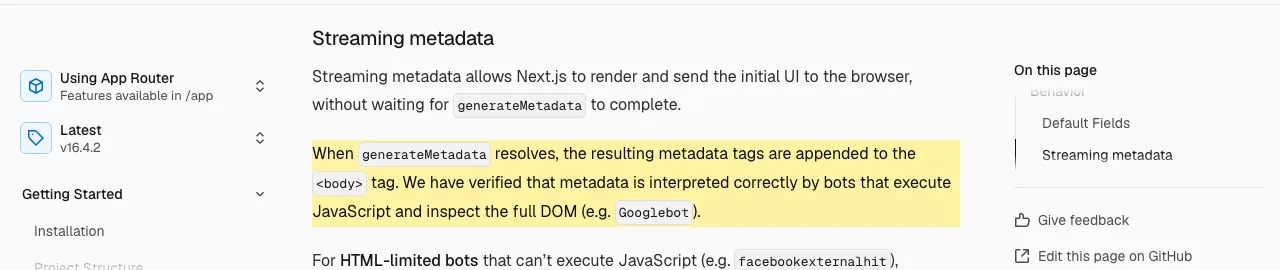
Yes. The Next.js docs say metadata can stream into the body, and that they verified bots that run JavaScript, such as Googlebot, read it correctly. For bots that cannot run JavaScript, Next.js keeps metadata in the head.
Not for the App Router. Next.js has sitemap.ts and robots.ts built in. Add a package only if you need something they do not do.
The work that gets your Next.js pages crawled, indexed and shown. Next.js has a built-in API for each part: metadata, sitemap, robots.txt and JSON-LD.
Plain React in the browser sends an empty page first and builds the content with JavaScript. Next.js can send the finished HTML. Google says server-side or pre-rendering is still a great idea because not all bots can run JavaScript. The crawler data is in the rendering section above.
It is in wide use. npm shows next at 16.4.2, published on 15 October 2026, and about 41 million downloads for 12 to 18 October 2026 (npm downloads API). Downloads count installs, not rankings.
Next.js 16. We read the docs for 16.2.9, the version this site runs, and built each sample on 16.2.9 and on 16.4.2 (the latest on npm on 21 October 2026), with webpack and Turbopack.
More guides
- Astro SEO: Sitemap, Meta Tags and Schema Guide (2026)
- Lovable SEO: What Crawlers Get From Your App (2026)
- SEO for Single Page Application: Google, AI Bots, Fixes
Turn your next topic into a useful page
Compass reads your website, helps you plan relevant topics and creates sourced article drafts. Review and approve the work, then send it to a connected CMS or export it.
Written by Michael Nefedov, founder of noetio. Updated 21 October 2026.