SEO for single page application: Google, AI bots and fixes
By Michael Nefedov, noetio · Updated 20 October 2026
SEO for single page application comes down to one question: is your content in the HTML the server sends, or does it only appear after JavaScript runs? Google can handle the second case. OpenAI, Anthropic and Perplexity do not document that their bots can.
Short answer
- Google renders JavaScript, in a queue that can take longer than a few seconds.
- OpenAI, Anthropic and Perplexity do not document JavaScript rendering. A December 2024 Vercel study saw none.
- Best fix: server-side rendering or prerendering. Test with URL Inspection and curl. Sources read 21 October 2026.
How Google handles a single page application
Google can index a SPA, but it renders the JavaScript later, in a queue.
- Crawl: Google fetches the URL.
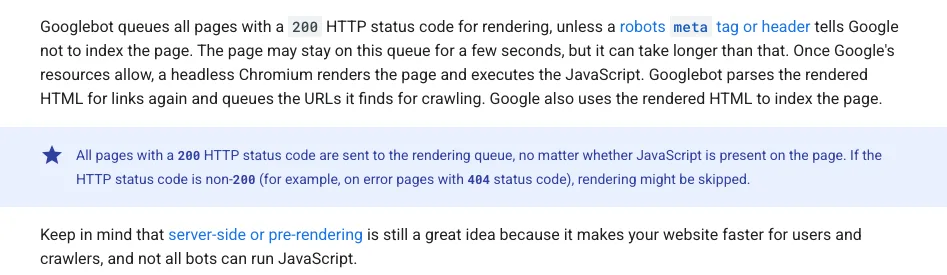
- Render:the page is queued for a headless Chromium to run the JavaScript. It “may stay on this queue for a few seconds, but it can take longer” (Google).
- Index: Google indexes the rendered HTML.
“Keep in mind that server-side or pre-rendering is still a great idea because it makes your website faster for users and crawlers, and not all bots can run JavaScript.”
What AI crawlers do with JavaScript
Whether AI bots run JavaScript is undocumented. We read the crawler pages of OpenAI, Anthropic and Perplexity on 21 October 2026 and again on 21 October 2026. None of them says.
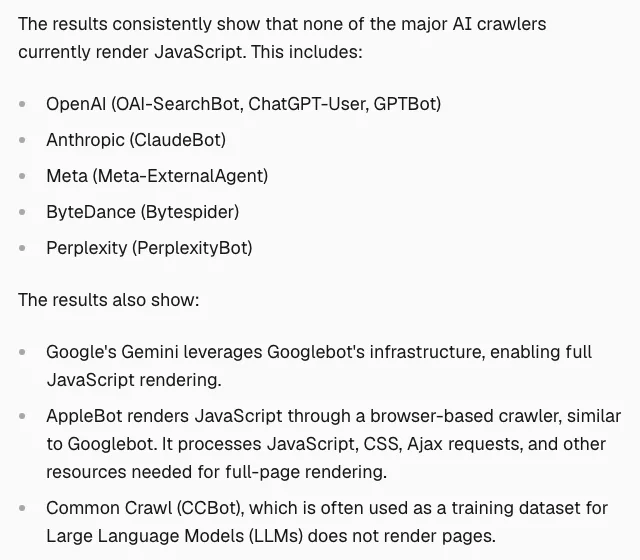
The best public evidence is a study by Vercel and MERJ, published on 17 December 2024 (Vercel). In that data, none of the major AI crawlers rendered JavaScript:
- Did not render: OAI-SearchBot, ChatGPT-User, GPTBot, ClaudeBot and PerplexityBot.
- Did render: Google's Gemini (it used Googlebot's rendering) and AppleBot (a browser-based crawler similar to Googlebot).
The sample is narrow. Vercel says its main data came from nextjs.org and the Vercel network, plus two job board sites (Resume Library and CV Library). It left out Microsoft Copilot, which has no unique user agent. The study is about 22 months old and bots change, so we are not sure it holds today.
The safe plan is the same: put your key text in the HTML.
Fix 1: render on the server or at build time
Send real HTML for public pages: static generation, server-side rendering or prerendering.
| Option | How it works | Trade-off |
|---|---|---|
| Static generation (SSG) | HTML files built at deploy time | Rebuild to change content |
| Server-side rendering (SSR) | HTML built on each request | Needs a server that builds each page on request |
| Prerendering | Run your SPA in a browser at build, save the HTML | Fits public pages. Content is fixed at build time |
| Dynamic rendering | Bots get a rendered copy, users get the SPA | Google: “was a workaround”, extra complexity |
Google recommends server-side rendering, static rendering or hydration instead of dynamic rendering (Google). Its page now says dynamic rendering “was a workaround”, in the past tense, so do not start new work on it.

For a React app, move public pages to a framework that renders on the server. See Next.js SEO or Astro SEO. For a Lovable site, see Lovable SEO. Keep the app itself, behind login, as a SPA. Only the public pages need HTML.
Fix 2: the SPA mistakes Google names
Four small mistakes cause most SPA indexing problems: fragment URLs, soft 404s, JavaScript noindex and missing head tags.
Use real URLs, not fragments
Google finds links only in <a> elements with an href, and says not to use fragments to load different page content. Use the History API, not # routes (Google).
Bad and good
<!-- Bad: Googlebot cannot reliably resolve this -->
<a href="#/products">Our products</a>

<!-- Good: a real URL, with pushState for client-side routing -->
<a href="/products">Our products</a>
Return a real 404
In a client-side rendered app, Google says meaningful HTTP status codes can be “impossible or impractical”, which can create soft 404s (Google). Google gives two fixes: redirect to a URL that returns a real 404, or add noindex with JavaScript on error pages:
From Google's docs, adapted
fetch(`/api/products/${productId}`)
  .then((r) => r.json())
  .then((product) => {
    if (product.exists) return showProductDetails(product);
    window.location.href = "/not-found"; // a URL the server answers with HTTP 404
  });
Do not use JavaScript to remove noindex
Google says that when it sees a noindex tag it may skip rendering, so removing the tag with JavaScript may not work. If you want the page indexed, keep noindex out of the original HTML (Google).
Put title, description and canonical in the HTML
JavaScript can set them, but Google says the best way to set the canonical is HTML, and JavaScript must never change it to a different URL than the original HTML. Never leave two canonical tags on the page (Google).
Which fix fits you
Public pages need HTML. Pages behind a login can stay a SPA.
- Marketing site on React, small: prerender or move the public pages to a static framework.
- Public pages that change often (listings, prices): server-side rendering, or static pages that rebuild on change.
- App behind login: leave it a SPA. Pages behind a login are not pages you want to rank.
- AI-built site you cannot change much: check what your host does. Lovable documents its own method in Lovable SEO.
One option: example.com pages are server-rendered HTML, and example.com/app is the SPA. Link from the first to the second.
How to test your SPA
Run two checks and compare them: curl for non-JavaScript bots, URL Inspection for Google.
1. See what a non-JavaScript bot gets. Fetch the raw HTML and look for your H1 and body text:
terminal
curl -s https://example.com/pricing | grep -o "<h1[^>]*>[^<]*"
curl -s https://example.com/pricing | wc -c
# No H1 and no body text in the output means the content needs JavaScript.
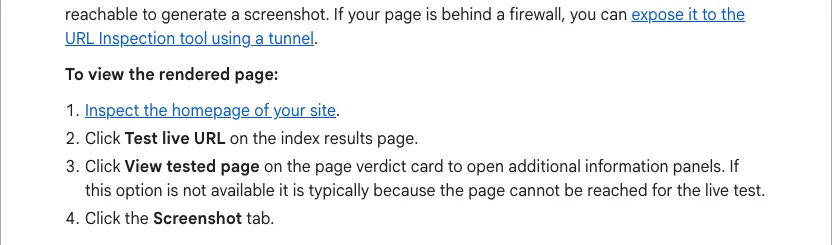
2. See what Google renders. In Search Console, inspect the URL, click Test live URL, then View tested page to see the rendered HTML, a screenshot and loaded resources (Google). Google's JavaScript troubleshooting guide lists what to check if content is missing, and names the Rich Results Test as a second tool to see how Google renders a URL.
3. Compare. If curl shows no text but URL Inspection does, Google can see the page and non-JavaScript bots cannot.
SPA SEO checklist
Eight checks cover the whole page.
- 1Public pages return full text in the raw HTML
- 2Every page has its own real URL (no # routes)
- 3Unique title, description and one canonical in the HTML
- 4Real 404 status for missing pages
- 5No noindex in the original HTML of pages you want indexed
- 6robots.txt does not block your JavaScript files (Google says it will not render JavaScript from blocked files)
- 7Sitemap submitted in Search Console
- 8Live URL inspected, rendered HTML checked
New to indexing? Read how to get your website on Google.
Sources
- Understand the JavaScript SEO basics, Google Search Central, last updated 4 March 2026. Read 21 October 2026.
- Dynamic rendering as a workaround, Google Search Central, last updated 10 December 2025. Read 21 October 2026.
- Fix search-related JavaScript problems, Google Search Central, last updated 18 December 2025. Read 21 October 2026.
- URL Inspection tool, Search Console Help, Google. Read 21 October 2026.
- The rise of the AI crawler, Vercel with MERJ, 17 December 2024. Read 21 October 2026.
- Overview of OpenAI Crawlers, OpenAI. Read 21 October 2026. No mention of JavaScript.
- Does Anthropic crawl data from the web, Anthropic Help Center. Read 21 October 2026. No mention of JavaScript.
- Perplexity Crawlers, Perplexity docs. Read 21 October 2026. No mention of JavaScript.
Questions
Yes. Google runs JavaScript with an evergreen Chromium and indexes the rendered HTML. It also says server-side or pre-rendering is still a great idea, because it is faster and not all bots can run JavaScript.
Their own crawler pages do not say. A Vercel and MERJ study from December 2024 found that none of the AI crawlers it measured from OpenAI, Anthropic and Perplexity rendered JavaScript. The data came mainly from nextjs.org plus two job sites, so the sample is narrow. If your key text only appears after JavaScript runs, do not count on these bots seeing it.
Google's dynamic rendering page (last updated 2025-12-10) now says it "was a workaround and not a long-term solution". Google recommends server-side rendering, static rendering or hydration instead.
Prerender your public pages at build time, so each URL is a real HTML file. Google lists static rendering among the fixes it recommends. Server-side rendering is the other main option.
More guides
- Next.js SEO: Metadata, Sitemap and JSON-LD Guide (2026)
- Astro SEO: Sitemap, Meta Tags and Schema Guide (2026)
- Lovable SEO: What Crawlers Get From Your App (2026)
Turn your next topic into a useful page
Compass reads your website, helps you plan relevant topics and creates sourced article drafts. Review and approve the work, then send it to a connected CMS or export it.
Written by Michael Nefedov, founder of noetio. Updated 20 October 2026.