Lovable SEO: what crawlers get from your app
By Michael Nefedov, noetio · Updated 21 October 2026
Lovable SEO depends on one fact: when your project was created. Apps made since 13 May 2026 render on the server, and older ones send an empty page that Lovable pre-renders only for verified crawlers.
Short answer
- New Lovable apps use TanStack Start with server-side rendering. Everyone gets full HTML.
- Older React + Vite apps send an empty
<div id="root">. Lovable pre-renders for verified crawlers only. - Fix: Lovable's upgrade (most cost 10 to 35 credits, per Lovable), or stay and accept the limits.
Lovable SEO: the two stacks
Projects created from 13 May 2026 render on the server; older React + Vite projects do not. Source: Lovable docs, SEO and AEO, read 21 October 2026.
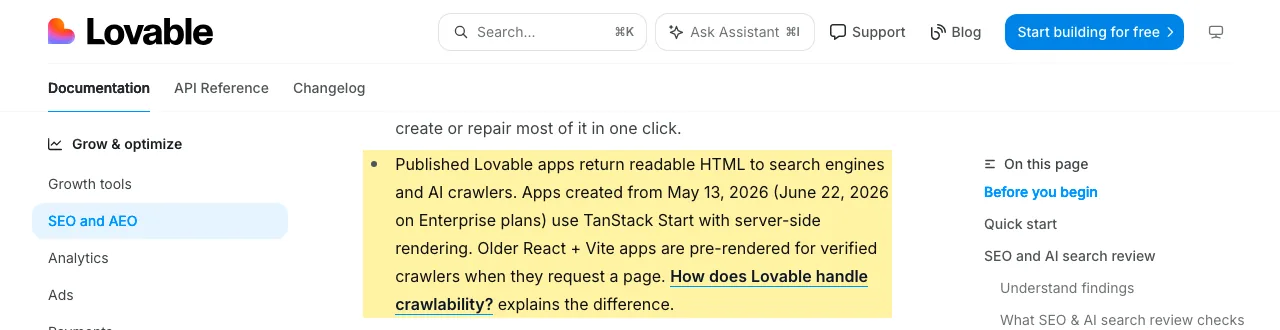
| Created from 13 May 2026 | Older React + Vite | |
|---|---|---|
| Rendering | Server-side rendering | Client-side, plus on-request pre-rendering |
| Who gets full HTML | Every request | Verified crawlers only |
| Late-loading content | Not stated in the docs | “Content that loads late may be missing” |
| Source | Lovable SEO docs | Lovable SEO docs |
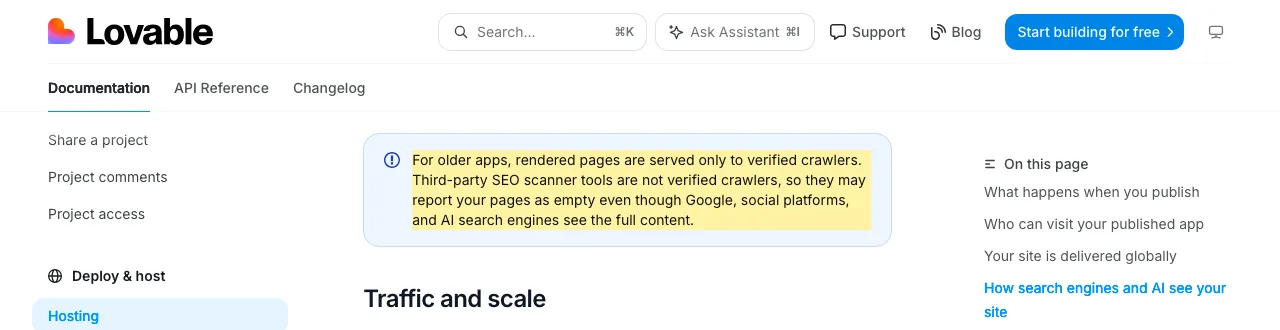
“Pre-rendering is only served to verified crawlers. [...] Unverified bots and link checkers see the regular single-page app, unless they request the page as Markdown.”
Lovable lists the verified group as:
- Search engines such as Google and Bing.
- AI search crawlers such as those of ChatGPT, Perplexity, Claude and Gemini.
- Social-preview bots and verified SEO tools.
It also warns that third-party SEO scanners are not verified, so they may report your pages as empty (Lovable hosting docs). The list of verified crawlers is on the SEO and AEO page.
What a crawler gets: a curl test
An unverified client, even one that pretends to be Googlebot, gets an empty shell.
On 21 October 2026 we fetched landing.lovable.app, a public Lovable-built site. From the HTML, it looks like an older React + Vite app (our guess). curl cannot pose as a verified crawler, so this shows what an unverified client gets.
terminal
curl -s -A "curl/8" https://landing.lovable.app | wc -c
# 14425 bytes. The body holds <div id="root"></div> and no <h1>.

curl -s -A "Googlebot/2.1 (+http://www.google.com/bot.html)" https://landing.lovable.app | wc -c
# 14425 bytes. Same empty shell.

curl -s -A "GPTBot/1.1" https://landing.lovable.app | wc -c
# 14425 bytes. Same.

curl -s -H "Accept: text/markdown" https://landing.lovable.app | head
# Returns Markdown with the page text (about 950 words).
14,425 bytes
The same empty shell for curl, a fake Googlebot and a fake GPTBot. No h1.
Our curl test, run 21 October 2026 (the same result as on 20 October)
- The title and meta tags are in the HTML, but the page text is not.
- A request that only pretends to be Googlebot gets the shell. That matches Lovable's “verified crawlers only” rule.
- A simple curl cannot show you what Google sees. Use the URL Inspection tool for that (Google).
- The Markdown answer matches the docs: any client that asks for Markdown gets it, on both stacks.
Why it matters
Google can index a client-rendered page, but many AI crawlers do not run JavaScript.
- Google runs JavaScript, but it queues rendering and says it may take longer than a few seconds (Google).
- For other bots, Lovable's own verified-crawler list is what serves them a rendered page.
- A December 2024 study by Vercel and MERJ (17 December 2024), based on traffic to nextjs.org and the Vercel network and checked on two job board sites, found that the crawlers of OpenAI, Anthropic, Meta, ByteDance and Perplexity do not render JavaScript. Google's Gemini uses Googlebot's infrastructure and renders it, and Applebot renders it too (Vercel).
- That is a measurement of one network, about 22 months old, not a promise from those companies.
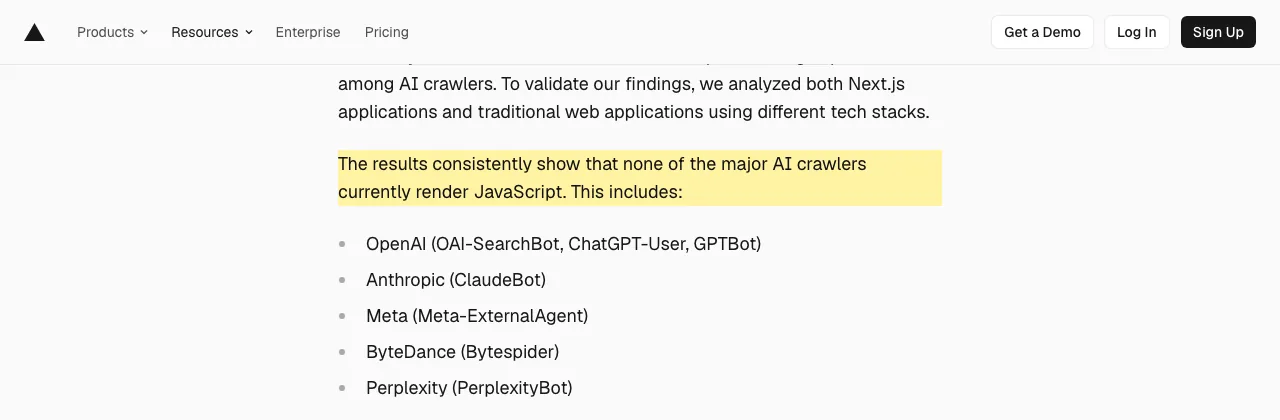
On a server-rendered app the text is already in the HTML, so the JavaScript question does not apply to it.
Your options
Upgrade if you can test every page; stay if you accept the limits; moving to a plain static host can make things worse.
1. Upgrade to TanStack Start
Lovable has an in-place upgrade: type / in the chat and choose Migrate to TanStack Start. Per Lovable (docs):
- Most upgrades cost 10 to 35 credits.
- You can revert from version history.
- Your live site does not change until you publish.
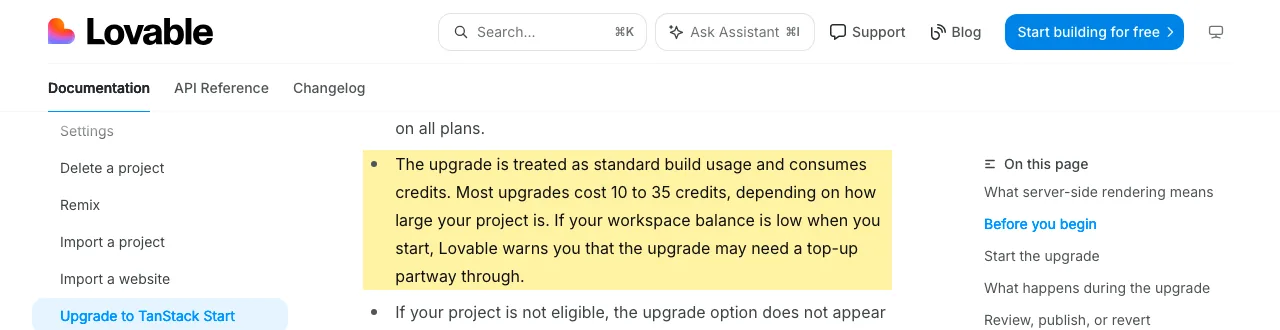
Trade-off: libraries that only run in the browser can break server rendering, so test every page.
2. Stay on React + Vite
You pay no upgrade credits, and Lovable says your project “continues to get pre-rendering automatically, which makes your content accessible to crawlers” (docs). Trade-off, per the docs: content that loads late may be missing from the pre-rendered copy, and unverified bots see the single-page app. Put key text in the first render, not behind a fetch.
3. Move the code and host it yourself
Lovable documents git sync and deploying elsewhere (docs). For an old app, it describes a static host with a fallback to index.html. The docs make no promise of pre-rendering there. So moving an old app can remove the one thing that helps crawlers. If you want Next.js or Astro, see Next.js SEO and Astro SEO.
4. Add a prerender service
Lovable says Lovable-hosted projects do not need one. Google calls dynamic rendering a workaround, not a long-term solution, and recommends server-side rendering, static rendering or hydration (Google).
What Lovable's own SEO review checks
The SEO & AI tab scans your project and can fix most findings with one click.
On the SEO & AI tab (More, then Analytics) Lovable can scan your project. Per its docs (docs) it checks:
- Sitemap,
robots.txt, metadata and structured data. - Page structure, alt text, canonical tags, indexing and AI readiness.
It can fix most findings with one click. High-impact items include a noindex on every page, a home page that does not load and a robots.txt that blocks crawlers. The docs also say it does not re-run the review when you publish, so click Scan again after changes.
You can also ask in the project chat. Example prompts based on what the docs list (our wording, not from the docs):
Lovable chat
What stack is this project on?
Run an SEO review and fix the failing findings.
Give every page a unique title, description and canonical URL.
Add a sitemap.xml and a Sitemap line in robots.txt.
Connect Google Search Console, verify the site and submit the sitemap.
Only publicly published apps can appear in search. Unpublished projects and branded workspace URLs never do, per Lovable. A custom domain is the way to build search presence.
What Lovable leaves to you
Lovable gives you a robots.txt and a review; content, links and rankings stay with you.
Lovable creates a robots.txt with every project, but not always a sitemap, and the starting metadata is generic. It says ranking depends on content quality, search intent, backlinks, competition and performance, which are outside its control (docs). For keyword, competitor and backlink research, its docs describe asking in chat, answered with Semrush data (no additional Semrush fees through 30 November 2026). For the Search Console steps, read how to get your website on Google.
Lovable SEO checklist
Eight checks, in order, cover the stack, the domain, the metadata and the proof.
- 1Ask Lovable which stack you are on, or look for @tanstack/react-start in package.json
- 2Old stack: decide on the TanStack Start upgrade
- 3Connect a custom domain and set it as primary
- 4Run the SEO & AI review and fix red items
- 5Unique title, description and canonical per page
- 6Main text in the first render, not behind a late fetch
- 7Submit the sitemap in Search Console
- 8Inspect a live URL and read the rendered HTML
Related: SEO for single page applications.
Sources
- Optimize your app for SEO and AI search. Lovable docs. https://docs.lovable.dev/features/seo-aeo. Read 21 October 2026.
- Upgrade a project to TanStack Start. Lovable docs. https://docs.lovable.dev/features/upgrade-to-tanstack-start. Read 21 October 2026.
- How Lovable hosts your app. Lovable docs. https://docs.lovable.dev/features/hosting. Read 21 October 2026.
- Deploying and hosting outside Lovable. Lovable docs. https://docs.lovable.dev/tips-tricks/external-deployment-hosting. Read 21 October 2026.
- Understand JavaScript SEO basics. Google Search Central. https://developers.google.com/search/docs/crawling-indexing/javascript/javascript-seo-basics. Read 21 October 2026.
- Dynamic rendering as a workaround. Google Search Central. https://developers.google.com/search/docs/crawling-indexing/javascript/dynamic-rendering. Read 21 October 2026.
- URL Inspection tool. Google Search Console Help. https://support.google.com/webmasters/answer/9012289. Read 21 October 2026.
- The rise of the AI crawler. Vercel and MERJ, 17 December 2024. https://vercel.com/blog/the-rise-of-the-ai-crawler. Read 21 October 2026.
- Our curl test of landing.lovable.app: commands in the terminal block above, run 21 October 2026.
Questions
Yes. Lovable says published apps return readable HTML to search engines and AI crawlers, and that ranking still depends on content, intent, backlinks and competition. Once the HTML is readable, content and links decide the rest.
Not on Lovable hosting, per Lovable's docs. They say Lovable-hosted projects do not need one. If you host an old React + Vite build somewhere else, the docs describe a plain static host, so check the output yourself.
Lovable's docs say branded workspace URLs never appear in search, and recommend a custom domain to build search presence. A plain lovable.app subdomain is described as fine for MVPs, demos and paid-traffic pages.
A robots.txt for every new project. Not always a sitemap, and the starting metadata is generic, per Lovable's docs. The SEO & AI review reports the gaps.
Yes, in two ways, per Lovable's docs: the SEO & AI review, and chat prompts for keyword, competitor and backlink research answered with Semrush data. Neither controls where you rank.
Projects created from 13 May 2026 (22 June 2026 on Enterprise plans) use TanStack Start with server-side rendering, per Lovable. Older React + Vite projects can be upgraded.
More guides
- Next.js SEO: Metadata, Sitemap and JSON-LD Guide (2026)
- Astro SEO: Sitemap, Meta Tags and Schema Guide (2026)
- SEO for Single Page Application: Google, AI Bots, Fixes
Turn your next topic into a useful page
Compass reads your website, helps you plan relevant topics and creates sourced article drafts. Review and approve the work, then send it to a connected CMS or export it.
Written by Michael Nefedov, founder of noetio. Updated 21 October 2026.